Best Compact Keyboards for Small Desks UK
Four compact UK-layout keyboards that create real mouse space, from a £20 Bluetooth board to a premium low-profile mechanical option.
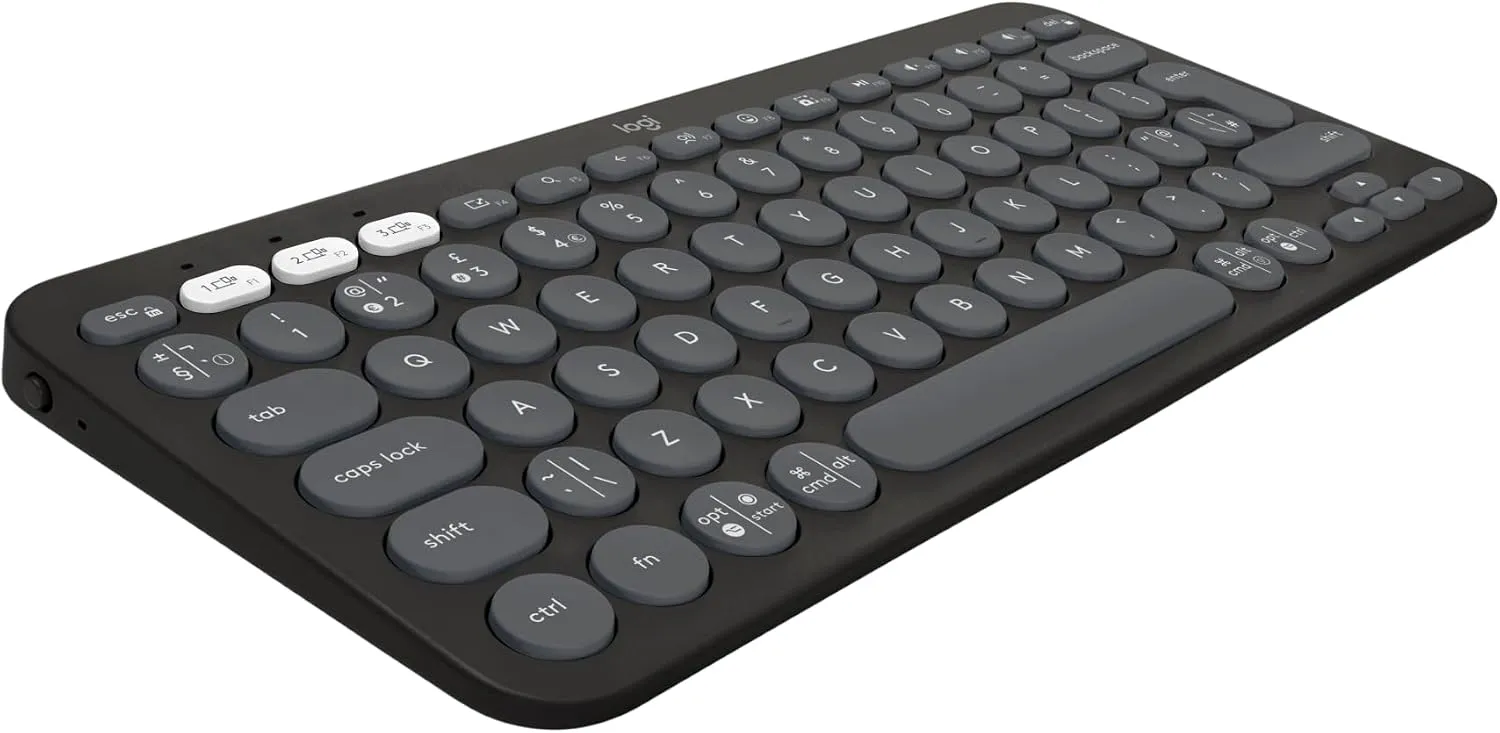
A compact keyboard is one of the least disruptive ways to make a small desk more comfortable.
The useful change is not simply a tidier look. Removing the number pad can bring the mouse 10cm to 15cm closer to the body, reduce the reach of the right arm and create room for a notebook on a desk that previously felt full.
The best choice depends on what should replace the full-size keyboard: a cheap board that gets out of the way, a quiet multi-device model, a more polished rechargeable keyboard, or a low-profile mechanical one.
The quick picks
Best overall
Logitech Pebble Keys 2 K380s
The Pebble Keys 2 is the easiest recommendation for most compact desks. It is only 27.9cm wide, pairs with three Bluetooth devices and stays quiet enough for a bedroom or shared room. The round keys and lack of backlighting are the compromises, but neither is unreasonable at this price.
- Best for: everyday home-office work, shared rooms and multi-device desks
- Why it stands out: properly compact, quiet and sensibly priced
Read the full Logitech Pebble Keys 2 K380s review.
Best budget option
Arteck HB305
The Arteck does the basic job for less. Its 28.2cm width suits an 80cm desk, it switches between three Bluetooth devices and it charges over USB-C. Build and key feel are plainly budget, but the feature list is difficult to fault around £20.
- Best for: students, occasional home offices and fold-away setups
- Why it stands out: USB-C charging and three-device pairing at a low price
Read the full Arteck HB305 compact keyboard review.
Best premium non-mechanical option
Logitech MX Keys Mini
The MX Keys Mini is the polished work keyboard in this group. Sculpted keys, adjustable backlighting, USB-C charging and strong multi-device support make it easier to live with for eight-hour days than the cheaper boards. It is not good value for occasional email, but the typing feel and finish justify more of the cost for daily users.
- Best for: full-time home working, quiet rooms and people who type all day
- Why it stands out: refined low-profile keys, backlight and excellent device switching
Read the full Logitech MX Keys Mini review.
Best compact mechanical keyboard
Keychron K3 Max
The K3 Max is the enthusiast option that still makes sense on a small desk. Its 75% layout retains full arrow and function keys, while low-profile mechanical switches keep the height under better control than a traditional mechanical board. Bluetooth, 2.4GHz wireless, wired USB-C, hot-swappable switches and VIA remapping make it exceptionally flexible.
- Best for: writing, programming and mixed work-and-gaming setups
- Why it stands out: mechanical feel without a full-size footprint
Read the full Keychron K3 Max review.
How much desk space does a compact keyboard save?
A conventional full-size keyboard is often around 43cm wide. The smallest keyboards here are roughly 28cm to 30cm wide. That difference can return about 13cm to 15cm to the mouse side of the desk.
On an 80cm desk, 15cm is substantial. It can be the difference between keeping the mouse beside the keyboard and pushing it against the edge. On a 100cm desk, it can create a comfortable notebook space without moving the keyboard off-centre from the monitor.
The ergonomic benefit comes from mouse position. A number pad pushes the mouse farther from the shoulder. If the number pad is rarely used, the body pays for a feature the work does not need.
Which compact layout should you choose?
75% for work that needs navigation keys
A 75% keyboard such as the Keychron K3 Max keeps the function row, arrow cluster and a narrow set of navigation keys. It is the safest compact mechanical layout for writing, programming and general productivity.
It is not the smallest possible keyboard, but it avoids hiding too many common controls behind key combinations.
Minimal layouts for maximum mouse room
The Pebble Keys 2, Arteck HB305 and MX Keys Mini focus on a narrow, laptop-like shape. They are better when the main goal is reclaiming horizontal space and the work does not depend on a dedicated navigation block.
These layouts suit email, documents, browsing, video calls and study. They are less convenient for number entry and specialist software with heavy shortcut use.
Keep the number pad if it earns its space
Compact keyboards are not automatically better. Accountants, data-entry workers and spreadsheet-heavy users may lose more time from removing the number pad than they gain in mouse room.
A separate wireless number pad is one compromise. It can live in a drawer and come out only when needed. That arrangement works particularly well on a desk used for both general writing and occasional accounts.
Membrane, scissor or mechanical?
The Arteck and Pebble Keys 2 provide quiet, low-profile everyday typing. They are affordable and make sense in shared rooms.
The MX Keys Mini uses a more refined scissor mechanism with sculpted keycaps. It feels closer to a premium laptop keyboard and is the least disruptive step up for office work.
The Keychron uses low-profile mechanical switches. The response is clearer and the switches can be changed, but the board costs more, sits higher and makes more noise. Mechanical is a preference, not an automatic upgrade.
Connection choices matter on a shared desk
Bluetooth is the cleanest option for most small desks because it does not occupy a USB port or add a receiver. Three-device switching is genuinely useful when a work laptop and personal computer share the same surface.
2.4GHz wireless is better for gaming and can be easier with desktop PCs. It needs a USB receiver, but the connection normally offers lower latency than Bluetooth.
USB-C wired mode is a useful fallback. It keeps a rechargeable keyboard usable when the battery is empty and may be required for configuration tools. Among these picks, the Keychron offers all three connection types.
What to check before ordering
- Confirm the listing says UK QWERTY layout. Product pages often mix UK and US variants.
- Measure keyboard width, not just the desk. A 30cm keyboard leaves roughly 50cm on an 80cm desktop for the mouse and everything else.
- Check whether the work needs a number pad, full-size arrows or dedicated navigation keys.
- Decide whether key noise will bother anyone sleeping, studying or working nearby.
- Check Bluetooth policy on a company laptop before choosing a Bluetooth-only keyboard.
- Treat current prices as a snapshot. Keyboard discounts change regularly, particularly across colour and switch variants.
The bottom line
Start with the Logitech Pebble Keys 2 K380s. It solves the space problem cleanly, works with three devices and does not ask for premium money.
Choose the Arteck if every pound matters, the MX Keys Mini if typing comfort and backlighting justify a higher budget, or the Keychron K3 Max if mechanical feel and customisation are part of the reason for buying.
The right compact keyboard is not the one with the fewest keys. It is the narrowest layout that keeps the keys the work actually uses.
Where to go next
Continue from this article into the most relevant compact setup guides, reviews, and hubs.
Hub
Small desk hub
Start with compact desk reviews and guides grouped by room size and setup type.
Read next
Hub
Small office chairs hub
Compare chairs for small desks, bedroom corners, and tuck-away setups.
Read next
Hub
Monitor arms and desk accessories hub
Find monitor arms, laptop stands, lights, keyboards, and cable fixes for compact desks.
Read next