Keychron K3 Max Review: A Premium Mechanical Keyboard for Small Desks
A 75% low-profile mechanical keyboard with UK layout, 2.4GHz wireless, Bluetooth, hot-swappable switches and serious customisation.
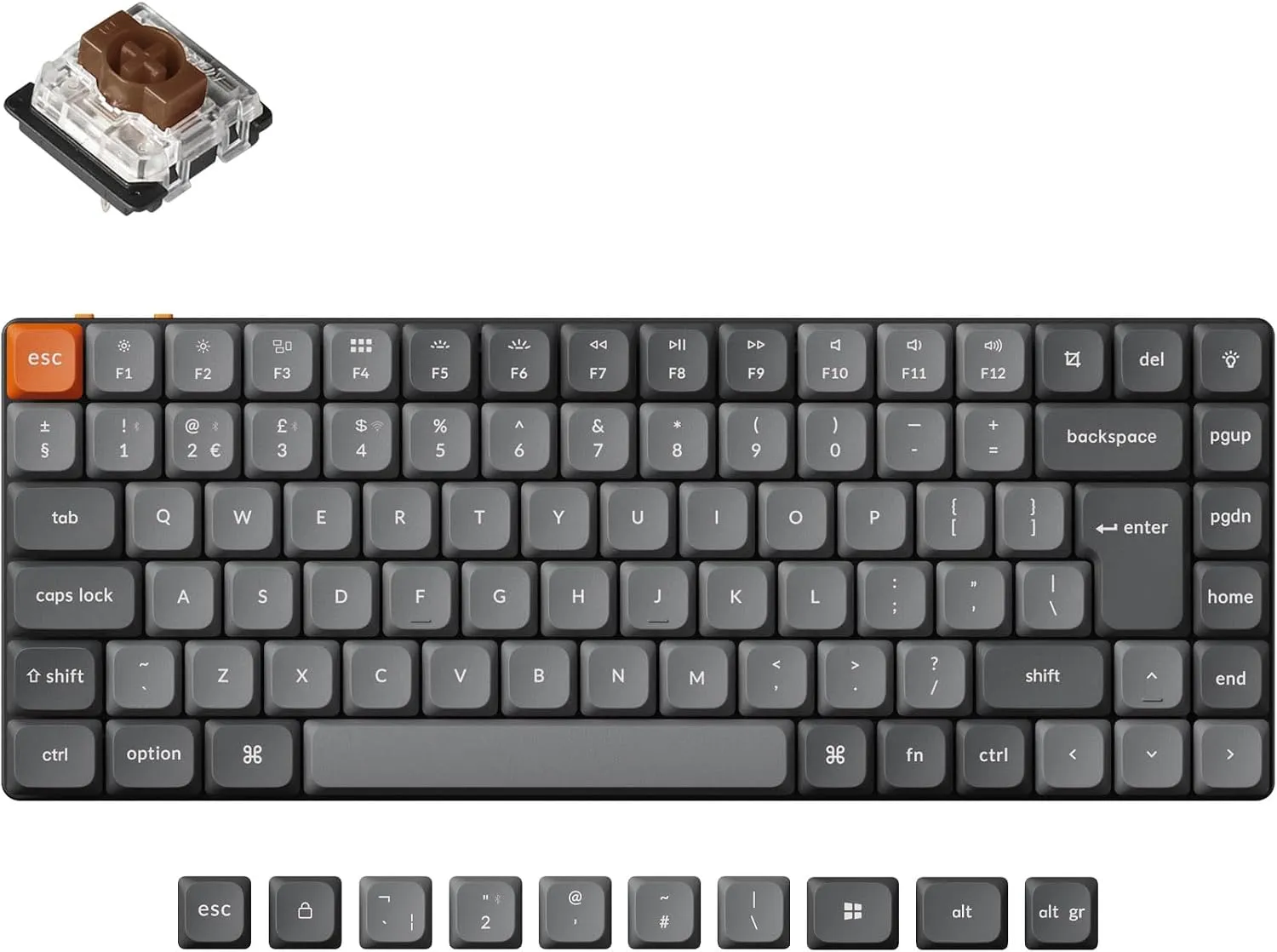
Who the Keychron K3 Max is for
The Keychron K3 Max is for someone who wants mechanical-keyboard feel without putting a tall, wide slab across a small desk.
Its 75% layout removes the number pad but keeps a function row, arrow keys and a narrow navigation column. That is a better compromise for programming, writing and editing than the most aggressively compressed 60% keyboards, where common commands move behind function layers.
This review covers the UK-layout K3 Max with low-profile Gateron Brown switches listed on Amazon. Keychron sells several similar variants, so check the layout, switch type and model name carefully before buying.
Recommended retailer Check the Keychron K3 Max UK layout on AmazonTypical price £109.99. Opens in a new tab. Check current priceA compact layout that keeps useful keys
The K3 Max is wider than the most minimal Bluetooth keyboards, but it earns that space with dedicated controls.
The number pad is gone, which brings the mouse closer to the typing position. The arrow cluster remains full-height and easy to find, while the function row does not need a secondary shortcut. For work that involves editing text, navigating code or using software shortcuts, this is a more comfortable layout than a 60% board.
It suits an 80cm desk, although the cheaper 28cm-wide Arteck HB305 creates more spare room. On a 100cm desk, the K3 Max strikes a good balance between mouse space and key access.
Low-profile mechanical switches
The low-profile design is important. Standard mechanical keyboards can be tall enough to encourage bent wrists unless they are paired with a rest. The K3 Max sits lower and feels closer to a laptop-style posture while retaining the clearer response of a mechanical switch.
The Brown-switch version aims for tactile feedback without the deliberate click of a blue switch. It will still be louder than a Logitech Pebble Keys 2 or MX Keys Mini. In a shared bedroom, late-night calls or thin-walled flat, that difference deserves more thought than RGB lighting or switch specifications.
The board is hot-swappable, but only with compatible Gateron low-profile mechanical switches. Hot-swapping means switches can be changed without soldering, which is useful if one fails or if the typing feel needs adjusting later. It is not compatibility with every mechanical switch on the market.
Three connection modes
The K3 Max supports 2.4GHz wireless, Bluetooth 5.1 and USB-C wired use.
The 2.4GHz connection offers a 1,000Hz polling rate, making it the better wireless mode for gaming and other latency-sensitive work. Bluetooth can pair with three devices and is the convenient choice for switching between a laptop, tablet and phone. Wired mode provides the simplest fallback and allows configuration without relying on wireless.
That connection choice is one of the K3 Max's strongest features. Cheaper Bluetooth boards are fine for office work, but they do not offer the same flexibility when the desk also handles gaming or a locked-down desktop computer.
QMK and VIA are useful, not just enthusiast bait
QMK and VIA support let the keyboard's keys and layers be remapped. That can sound needlessly technical, but it has practical small-layout uses.
Caps Lock can become a shortcut key. A rarely used navigation key can trigger a common application command. Mac and Windows layers can be adjusted to match how the desk is actually used.
Most owners do not need to rebuild the whole layout. The value is that the keyboard can adapt when one missing shortcut becomes irritating, rather than forcing the user to accept the factory layout forever.
Battery and backlighting
Keychron states up to 78 hours of battery life with the backlight off from the 1,550mAh battery. RGB lighting will shorten that figure, sometimes substantially depending on brightness and effect.
For a permanent desk, charging every few weeks is manageable. It is less carefree than the long battery intervals of a non-backlit Logitech keyboard, but USB-C charging and wired use mean an empty battery does not make the keyboard unusable.
The backlight is useful in a dim room. RGB effects are optional, and a restrained static setting suits a bedroom office better than a moving rainbow.
What does not work
The price is hard to ignore. At roughly £110, the K3 Max costs four or five times as much as a competent compact membrane keyboard.
It is not silent. Brown switches are not clicky, but mechanical key noise still travels in a shared room.
It remains taller than a basic low-profile board. People sensitive to wrist angle may still want a slim rest or a lower chair-and-desk relationship.
Variants are confusing. K3, K3 Pro and K3 Max listings can look nearly identical. UK and US layouts, switch colours and hot-swap support also vary. Check the exact title before paying.
Keychron K3 Max verdict
The Keychron K3 Max solves the usual mechanical-keyboard problem for compact rooms: it delivers proper switches and useful keys without taking over the desk.
It is the premium pick for writing, programming and mixed work-and-gaming setups. The Logitech Pebble Keys 2 is better value for quiet general office work, and the MX Keys Mini is the cleaner premium choice for anyone who does not want mechanical switches.
Where to go next
Continue from this article into the most relevant compact setup guides, reviews, and hubs.
Accessory guide
Best Monitor Arms for Small Desks UK 2026
Compare clamp arms, premium arms, and no-clamp options for smaller desks.
Read next
Desk depth
What Desk Depth Do You Need for a 24-Inch Monitor?
Check whether the accessory solves the real problem, or whether the desk is too shallow.
Read next
Desk hub
Small desk reviews
Browse compact desks that pair well with monitor arms, laptop stands, and tidy cable routes.
Read next