Logitech Pebble Keys 2 K380s Review: Compact, Quiet and Sensibly Priced
A compact multi-device keyboard for small desks, with quiet keys, three Bluetooth connections and a genuinely useful 27.9cm width.
Who the Pebble Keys 2 K380s is for
The Logitech Pebble Keys 2 K380s is for a small desk where a full-size keyboard is taking up space for a number pad that rarely gets used.
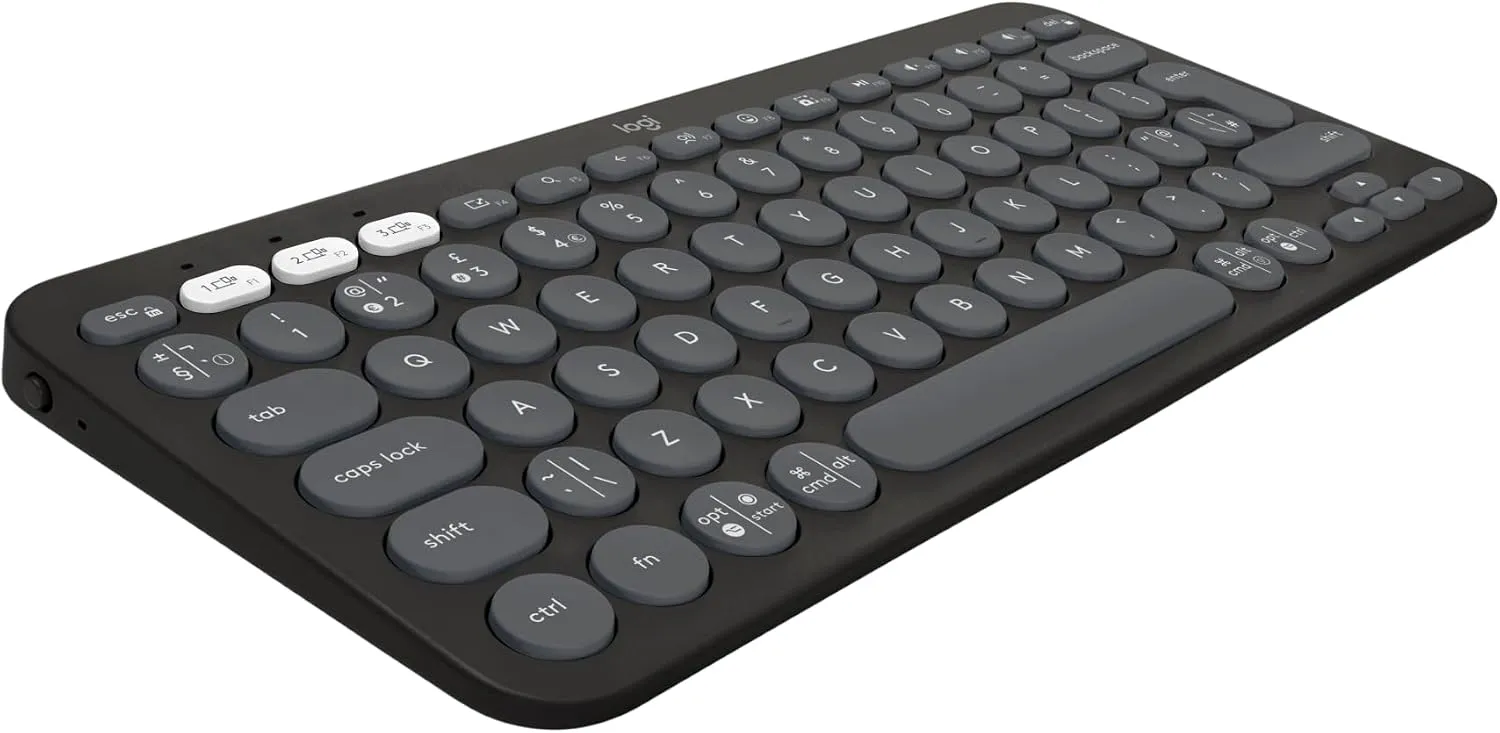
At 27.9cm wide and 12.4cm deep, it is a properly compact keyboard rather than a full-size board with a few keys shaved off. That smaller width creates useful mouse room on an 80cm or 100cm desk and helps keep both hands closer to the centre of the monitor.
It also makes sense for anyone switching between a work laptop, personal computer and tablet. Three Bluetooth connections can be changed from the keyboard, so the desk does not need a separate set of peripherals for each device.
Recommended retailer Check the Logitech Pebble Keys 2 K380s on AmazonTypical price £24.99. Opens in a new tab. Check current priceThe size is the main reason to buy it
Full-size keyboards are often around 43cm wide. The Pebble Keys 2 is 27.9cm, which can return roughly 15cm of horizontal space to the desk.
That difference is not cosmetic. A narrower keyboard lets the mouse sit closer to your shoulder instead of forcing your arm out towards the edge. On a tiny desk, it can also create enough room for a notebook or let the keyboard slide into a drawer when work is finished.
The keys themselves are not miniature. Logitech removes the number pad and compresses the navigation controls rather than making the main typing area uncomfortably small. The round keycaps are the distinctive part. Some people like the softer look; others will prefer the more conventional shapes on the Logitech MX Keys Mini.
Typing feel and noise
This is a low-profile membrane keyboard designed for quiet everyday typing. The short key travel works well for email, documents, browsing and study, particularly in bedrooms or shared living spaces where a clattery mechanical keyboard would become irritating.
It does not offer the crisp, deliberate response of the Keychron K3 Max. It also lacks the more refined sculpted keycaps and backlight of the MX Keys Mini. The trade-off is price: the K380s provides the useful compact layout and multi-device switching without charging premium-keyboard money.
The round keycaps may need a short adjustment if you are coming from a laptop keyboard. They leave slightly more visible space between keys, and the corners do not catch an off-centre press in quite the same way as square caps.
Three-device Bluetooth switching
The K380s can pair with three Bluetooth devices. Dedicated Easy-Switch keys move between them, making it a sensible option for a hybrid desk with a work laptop during the day and a personal device in the evening.
Compatibility is broad: Logitech lists support for Windows, macOS, iPadOS, Android and ChromeOS. The UK QWERTY version matters here. Amazon listings sometimes combine several regional layouts on one page, so check that "QWERTY UK Layout" is selected before ordering.
There is no wired typing mode. Bluetooth is the point of the product, and it keeps the desk free from another cable, but buyers working on locked-down office computers should confirm that Bluetooth peripherals are permitted.
Battery and daily upkeep
The Pebble Keys 2 uses replaceable batteries rather than USB-C charging. That divides opinion.
The upside is that charging becomes a rare concern and the keyboard does not need another permanent lead. The downside is that it feels less modern than a rechargeable board, particularly if the rest of the desk already charges over USB-C.
There is no backlight, which helps battery life but rules it out for people who regularly work in a dim room. If illuminated keys matter, the MX Keys Mini is the quieter premium choice and the Keychron K3 Max is the mechanical one.
What does not work
There is no number pad. That is how the keyboard saves space. If the working day involves frequent number entry, the wider layout may be worth keeping.
The keys are not backlit. The dark graphite version can be hard to read in a poorly lit bedroom.
The layout is compact. Navigation keys and shortcuts are less spacious than they are on a full-size board. This is fine for general work but not ideal for people who constantly use Home, End, Page Up and Page Down.
It is not a premium typing experience. The K380s feels good for the price, but the MX Keys Mini and low-profile mechanical boards provide a firmer, more deliberate response.
Logitech Pebble Keys 2 K380s verdict
The Pebble Keys 2 K380s gets the important small-desk decisions right. It removes width, not useful main-key size; it works with three devices; and it stays quiet enough for a bedroom office.
Buy it if you want to reclaim desk space without spending close to £100. Pay more for the MX Keys Mini if backlighting, USB-C charging and better-shaped keycaps matter. Choose the Keychron only if mechanical feel and customisation are worth the extra height, noise and cost.
Where to go next
Continue from this article into the most relevant compact setup guides, reviews, and hubs.
Accessory guide
Best Monitor Arms for Small Desks UK 2026
Compare clamp arms, premium arms, and no-clamp options for smaller desks.
Read next
Desk depth
What Desk Depth Do You Need for a 24-Inch Monitor?
Check whether the accessory solves the real problem, or whether the desk is too shallow.
Read next
Desk hub
Small desk reviews
Browse compact desks that pair well with monitor arms, laptop stands, and tidy cable routes.
Read next