Arteck HB305 Compact Keyboard Review: A Useful £20 Space Saver
A slim 28.2cm Bluetooth keyboard with three-device switching, USB-C charging and very little desk clutter for the money.
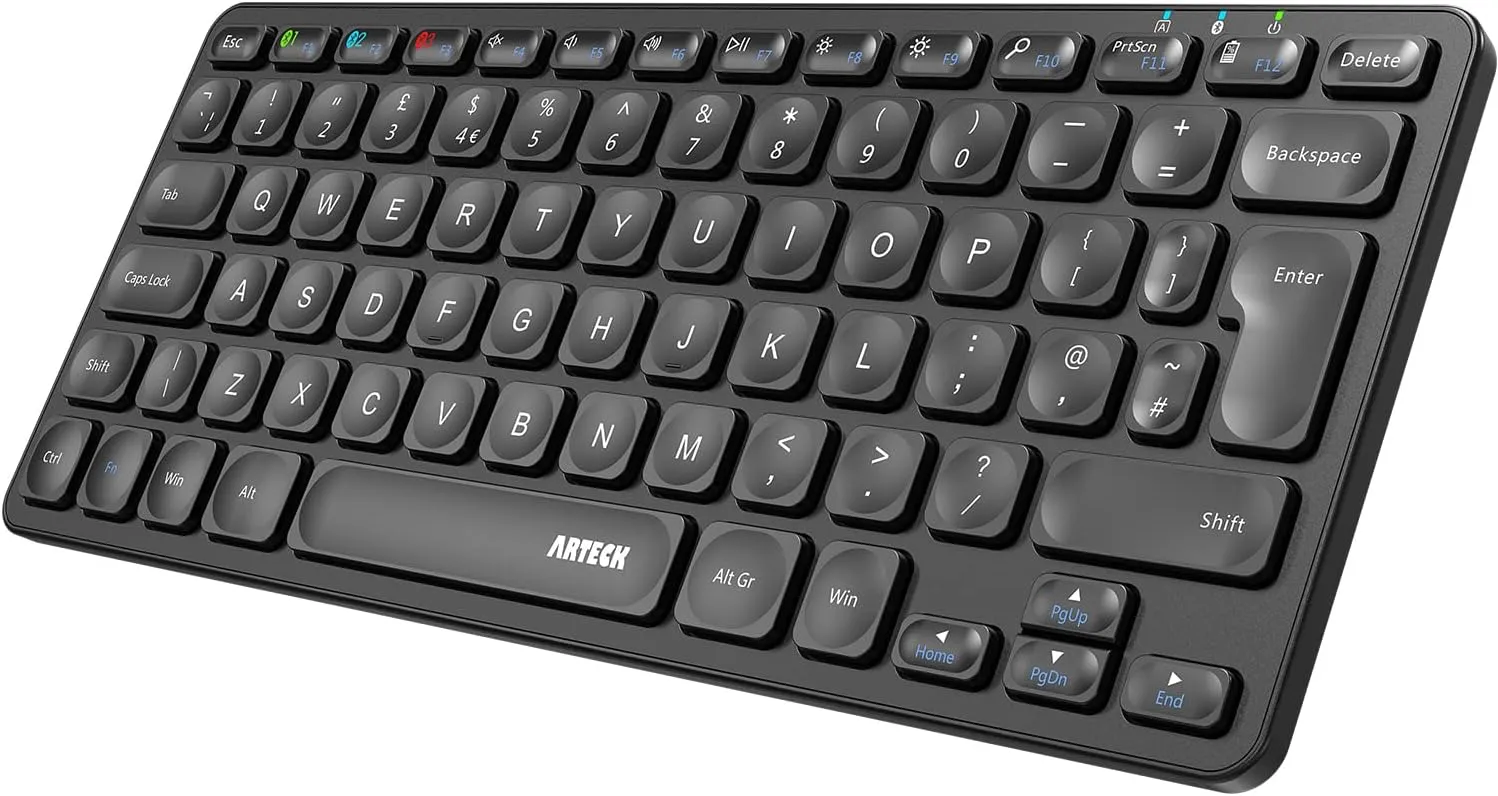
Who the Arteck HB305 is for
The Arteck HB305 is for someone who wants a genuinely small wireless keyboard and would rather spend £20 than £80 solving the problem.
Its footprint is the strongest argument. Arteck lists it at 28.2 x 11.4 x 0.6cm, so it takes up little more room than a 13-inch laptop keyboard. On an 80cm desk, that leaves a sensible mouse area and space for a drink or small notebook.
It is also unusually practical for the price. The keyboard can connect to three Bluetooth devices, charges over USB-C and weighs about 343g. That makes it easy to move off a folding desk or store in a drawer when a bedroom needs to stop looking like an office.
Recommended retailer Check the Arteck HB305 compact keyboard on AmazonTypical price £18.40. Opens in a new tab. Check current priceCompact enough to make a real difference
There is little point buying a "compact" keyboard that remains 35cm or 38cm wide. The HB305 is 28.2cm, putting it in the same useful small-desk class as the Logitech Pebble Keys 2 and MX Keys Mini.
Most of the saving comes from removing the number pad and tightening the navigation area. The main letter keys retain a familiar size, which is more useful than squeezing every key to make an eye-catching product photo.
The 11.4cm depth is particularly helpful on shallow desks. A keyboard that is several centimetres deeper can leave too little space for the wrists on a 40cm desktop. This one stays out of the way.
Typing feel and build
Expect a basic low-profile typing feel. The HB305 is not competing with the aluminium-trimmed Keychron K3 Max or the more refined keycaps of the MX Keys Mini.
That does not make it bad. Short-travel keys are quiet, familiar to laptop users and suitable for ordinary home-office work. The compromise is feedback. Budget membrane boards can feel softer and less consistent than premium scissor switches, particularly on larger keys such as Space and Enter.
The plastic body keeps weight down. That is useful for portability but gives the keyboard less planted weight on the desk. If the surface is glossy or very smooth, a thin desk mat can stop it shifting while typing.
Three devices without three keyboards
The HB305 can stay paired with three Bluetooth devices and switch between them from the keyboard. That is valuable in a small room because duplicate equipment quickly defeats the point of buying compact furniture.
The listing covers Windows, macOS, iPadOS, iOS and Android devices. It is a sensible companion for a laptop plus tablet, or for separate work and personal computers.
There is no 2.4GHz USB receiver in this model. Bluetooth keeps a laptop port free, but it may not suit a desktop PC without built-in Bluetooth or a company computer that blocks wireless accessories.
USB-C charging is welcome at this price
Arteck states up to six months between charges based on two hours of use per day. Real battery life will depend on work patterns and how reliably the keyboard enters sleep mode, but the important part is simpler: it recharges over USB-C rather than consuming disposable batteries.
The included cable means there is nothing else to buy. The keyboard does not need to stay plugged in, so it still helps keep a small desk clear.
There is no backlight. That is normal at this price and helps battery life, but it limits the HB305 for late-night work in a dark room.
What does not work
The build is plainly budget. The light plastic shell is easy to move but does not feel as solid as more expensive keyboards.
There is no backlight. A desk lamp becomes more important if the room is dim.
There is no number pad. Spreadsheet-heavy users should consider whether the saved mouse space is worth slower number entry.
The compact navigation layout is a compromise. Frequent use of navigation and function keys will feel less comfortable than on a wider board.
How it compares with the Logitech Pebble Keys 2
The Logitech Pebble Keys 2 K380s is the better-rounded buy. It has a stronger brand ecosystem, a tidier design and a more established multi-device layout.
The Arteck counters with USB-C charging and a lower price. If the keyboard only needs to handle email, study and browsing, that saving is reasonable. If it will be typed on for a full working day, the Logitech is worth the modest step up.
Arteck HB305 verdict
The Arteck HB305 is cheap in the useful sense. It strips out premium materials and lighting, but keeps the small footprint, multi-device pairing and rechargeable battery that matter on a compact desk.
Buy it for a student setup, occasional home office or fold-away workstation. Spend more if typing feel is central to the job or if the keyboard needs to feel planted during long daily sessions.
Where to go next
Continue from this article into the most relevant compact setup guides, reviews, and hubs.
Accessory guide
Best Monitor Arms for Small Desks UK 2026
Compare clamp arms, premium arms, and no-clamp options for smaller desks.
Read next
Desk depth
What Desk Depth Do You Need for a 24-Inch Monitor?
Check whether the accessory solves the real problem, or whether the desk is too shallow.
Read next
Desk hub
Small desk reviews
Browse compact desks that pair well with monitor arms, laptop stands, and tidy cable routes.
Read next