VIVO Clamp-On Keyboard Tray Review: More Desk Depth Without Drilling
VIVO's clamp-on keyboard tray adds a 68cm pull-out shelf under your desk with no drilling. What it needs to fit, why 80cm desks miss out and who it suits.
The problem this solves
Shallow desks save floor space, but they run out of depth fast. On a 50cm desk, a monitor, keyboard and mouse all compete for the same strip, and the screen usually ends up closer than you'd like.
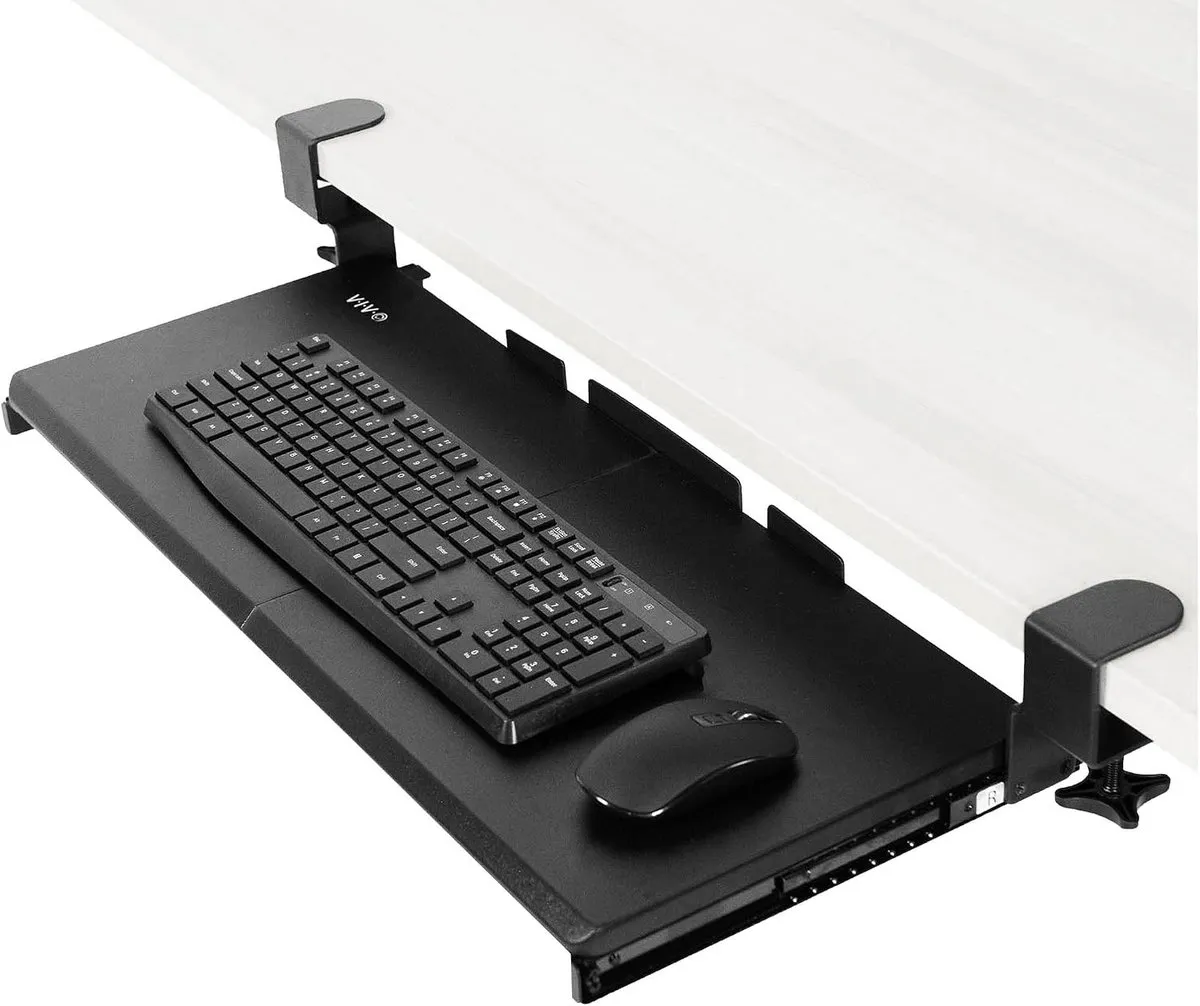
A keyboard tray moves the keyboard and mouse down and forward, onto a shelf that slides out from under the desk. The monitor can then sit at the back of the desktop, where it should be. When you've finished, the tray slides back underneath and the desk goes back to its normal depth.
VIVO's version clamps onto the front edge of the desk, so there's no drilling. It has been on sale since 2018 and has more than 13,000 ratings on Amazon UK averaging 4.3 stars, which makes it the benchmark for this kind of tray. It was £49.99 when checked, sold through VIVO's own Amazon store.
Recommended retailer Check the VIVO keyboard tray on AmazonPrice and stock shown by retailer. Opens in a new tab. Check current priceCheck these measurements before anything else
- Tray: 68.1 x 27.9cm, a two-part panel
- Clamp to clamp: 82.6cm
- Slide-out: up to 21.6cm beyond the desk edge
- Runner length: about 31cm under the desk
- Desk thickness: 1.3cm to 3.2cm
- Tray height: sits 3.8cm to 7cm below the desk surface
- Load: 5kg
- Warranty: three years
The clamp-to-clamp width is the number most likely to catch out small-desk owners. The two clamps grip the front edge of the desk 82.6cm apart, so an 80cm desk is too narrow. That rules it out for the ODK 80 x 40cm desk and every desk in our under-80cm desk guide. A 100cm desk like the VASAGLE LWD045 has room to spare.
VIVO also makes a small version, with a 50.8cm tray and 66cm between the clamps, which would suit an 80cm desk. When checked, Amazon UK was quoting a dispatch time of several months for it, so don't count on it being available.
The desk also needs a clear underside. The clamps grip a square front edge, and the runners need about 31cm of free space behind it. One owner had to return theirs because metal bars under the desk blocked the clamps. Check for front crossbars, aprons, drawers and bevelled edges before ordering. On some desks, the frame is exactly where the clamps need to go.
What it's like to use
With the tray pulled out, the keyboard sits a few centimetres below the desktop and up to 21.6cm closer to you. On a standard 75cm desk that's usually an improvement. Most people type more comfortably with the keyboard lower than a typical desk surface, with their shoulders down and elbows at roughly 90 degrees.
The tray is wide enough for a full-size keyboard and a mouse side by side. At 68cm it's roomier than the built-in trays on many compact desks. The one on the VECELO corner desk, for comparison, is 61cm and a squeeze for both.
The catch is clearance. VIVO says the tray surface sits 3.8cm to 7cm below the top of the desk. Take off the thickness of the desk itself and, on a typical 2.5cm top, that leaves at most about 4.5cm between the underside of the desk and the tray. A slim keyboard slides under. A chunky mechanical keyboard or a tall mouse often won't. One owner found they had to lift the mouse off every time before pushing the tray home. Another was happy with the gap, so it depends heavily on what you type on. A low-profile keyboard like the Logitech MX Keys Mini avoids the problem.
Small-room trade-offs
The tray gives you depth when you want it, but that depth has to come from somewhere. Pulled out, it adds 21.6cm to the desk, and your chair sits that much further into the room. If the space behind your chair is already tight, check our guide to space behind a desk with that extra 21.6cm included.
It also changes how the chair parks. The tray hangs below the desktop, so chair arms hit it earlier than they would hit the desk. A chair with flip-up arms or no arms at all, such as the DRAGONN kneeling chair, tucks in more neatly.
Build and installation
Installation gets good marks. It's a short build with the hardware and instructions included, then the clamps tighten onto the desk edge. Owners generally describe the finished tray as rigid and solid, and it glides without drifting out on its own.
The minor complaints are about details rather than failures:
- the clamp brackets use a little width either side of the tray that feels wasted
- one owner's tray had two pre-drilled holes in the wrong place
- one owner reports the tray tilting slightly after months of use, which is the inherent weakness of hanging a shelf from two clamps rather than screwing runners along the desk
The 5kg rating is plenty for a keyboard, mouse and wrist rest. It's not a laptop shelf for leaning on.
How it compares
Against the Duronic DKTPX1 (around £40), the Duronic has a similar 68 x 28.5cm platform and tool-free clamps from a UK brand. It's the obvious alternative if it's cheaper on the day. Duronic doesn't list the clamp-to-clamp width, so measure your desk before assuming it fits an 80cm top.
Against the ERGOMAKER 65 x 30cm tray (around £34), the ERGOMAKER is 75.6cm between the clamps, which is the key figure: it fits an 80cm desk where the VIVO doesn't. It has a much smaller review base, but it's the one to look at for a compact desk.
Against a monitor arm, an arm gets the screen off the desktop and pushes it back. A tray brings the keyboard forward. On a very shallow desk you may want both, but if you only buy one, start with whichever end of the desk feels most crowded.
VIVO keyboard tray verdict
If you have a desk 100cm wide or more with a clear, square front edge, this is a solid, renter-friendly upgrade. It gives you more usable depth, a better typing height and a clearer desktop, then slides away.
Its limits are all about fit. It's too wide for 80cm desks, the gap under the desk suits slim keyboards and mice best, and some desk frames block the clamps. Measure those three things first and it's easy to recommend.
Where to go next
Continue from this article into the most relevant compact setup guides, reviews, and hubs.
Desk depth
What Desk Depth Do You Need for a 24-Inch Monitor?
See how much depth a shallow desk really needs once the keyboard moves off it.
Read next
Monitor arms
Best Monitor Arms for Small Desks UK 2026
The other way to win back depth: push the screen back instead of the keyboard forward.
Read next
Low-profile keyboards
Best Compact Keyboards for Small Desks UK
Slimmer keyboards that slide under the desk with the tray still loaded.
Read next
Desk hub
Small desk reviews
Browse compact desks that pair well with monitor arms, laptop stands, and tidy cable routes.
Read next