Small Corner Desk Setup Ideas for UK Bedrooms
A practical guide to planning a small corner desk setup in a UK bedroom, from measurements and chair clearance to monitor, laptop, and cable choices.
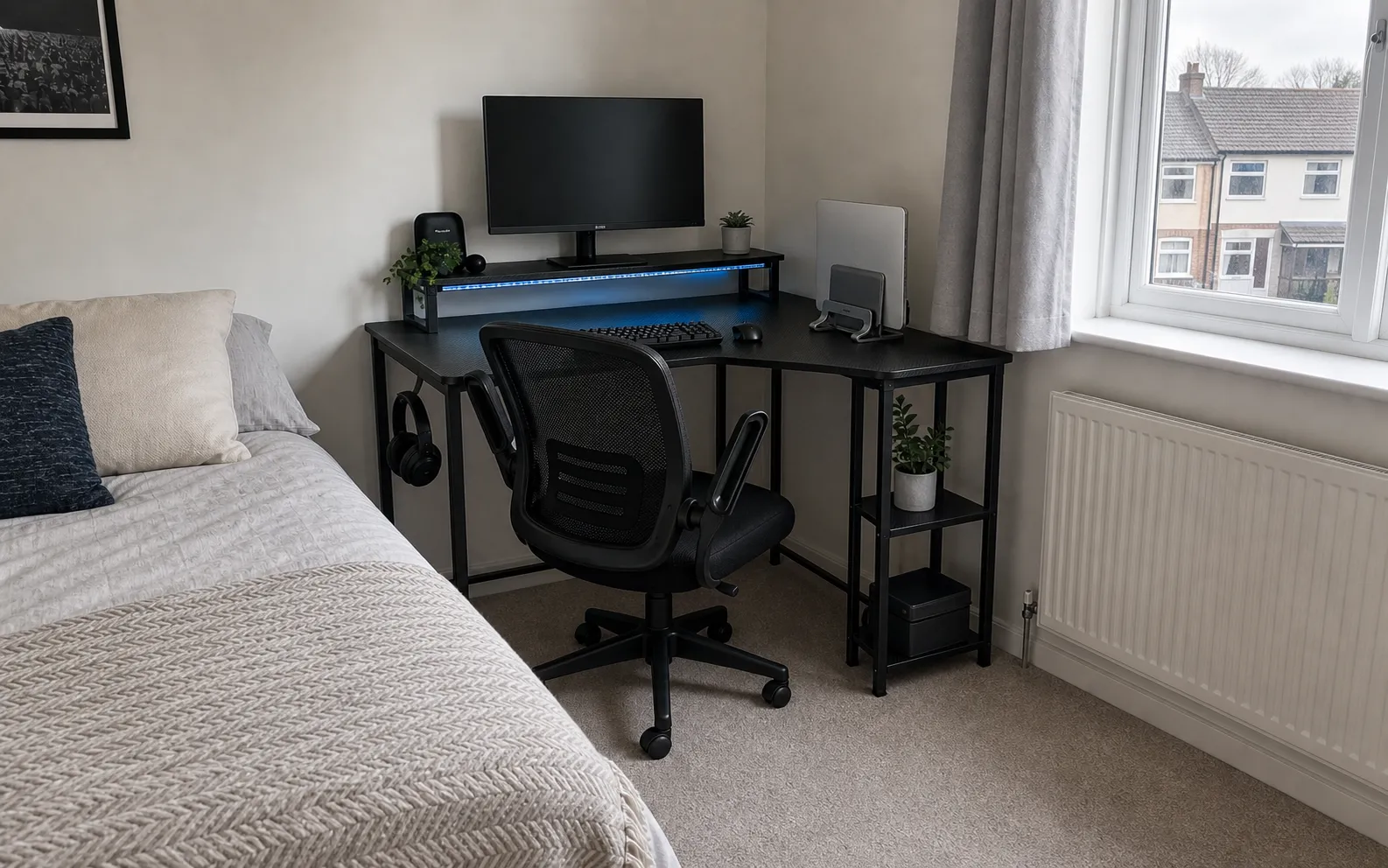
A small corner desk setup can be brilliant in a UK bedroom, but only if the room still works as a bedroom afterwards.
That is the real test. The desk can look perfect online and still fail if the chair blocks the bed, the wardrobe door clips the return side, or the window radiator leaves nowhere sensible for cables.
The best small corner setups are measured as a whole system: desk, chair, monitor, laptop, cables, socket position, and walking space.
Start with the corner, not the desk
Before looking at desks, measure the corner in both directions.
You need three numbers:
- the clear wall length on the main side
- the clear wall length on the return side
- the depth available for the chair to move back
That last number is the one people miss. A compact L-shaped desk can fit against the wall and still be awkward if the chair has nowhere to go.
In a bedroom, aim for enough clearance to sit, turn slightly, and stand up without nudging the bed. If the chair lives between the desk and bed, a flip-up-arm chair is usually easier to manage than a wide fixed-arm chair.
When an L-shaped desk makes sense
An L-shaped desk is worth considering when the corner is genuinely useful.
It works well when:
- the straight wall is too short for a comfortable 120cm desk
- the return side can hold storage, a laptop, or a small PC
- the desk can sit near a socket without trailing cables across the room
- the chair can face the main monitor without twisting
The Bestier 106.5cm L-shaped desk is a good example of the type: compact main width, side shelves, monitor shelf, hooks, and built-in power.
An L-shaped desk is the wrong choice if the room only has a narrow strip of floor. In that case, a simple ODK 80 x 40cm desk or folding desk will be easier to live with.
Put the monitor in the right place first
The monitor decides whether the setup feels comfortable.
On a small corner desk, the screen should sit directly in front of the chair, not halfway around the return. If the screen is off to one side, your neck pays for the layout.
There are three good ways to handle the monitor:
- use the desk's built-in monitor shelf if it lines up with the chair
- use a shallow monitor stand if the desk has enough depth
- use a monitor arm if the desktop is shallow or crowded
For normal work, one well-placed 24 inch monitor is usually better than trying to squeeze in two displays. If you are unsure about depth, read What Desk Depth Do You Need for a 24-Inch Monitor?.
Move the laptop out of the main work zone
The fastest way to reclaim a small desk is to stop treating the laptop as a second open screen.
If you use an external monitor, keyboard, and mouse, put the laptop upright in a vertical stand. A product like the UGREEN vertical laptop stand can hold the laptop at the back of the desk or on the return side, which keeps the main surface clear.
This works best when:
- the laptop supports closed-display mode
- the vents are not blocked
- the power and monitor cables can run neatly behind the desk
- the keyboard and mouse sit directly in front of the monitor
For occasional laptop-only work, keep the setup simpler. A laptop stand, compact keyboard, and mouse may be enough.
Choose a chair that can tuck away
The chair is what makes or breaks a bedroom workstation.
A deep ergonomic chair can be comfortable, but it can also dominate the room. A smaller mesh chair with flip-up arms is often the better compromise because it can slide farther under the desk when the workday ends.
The Naspaluro office chair with flip-up arms is the kind of design to look for. The arms can lift out of the way, while the mesh back and padded seat still feel like a proper desk chair.
Whatever chair you choose, measure the caster base, not just the seat. The base is usually the widest part.
Keep storage on the return side
The return side of an L-shaped desk should not become a dumping ground.
Use it for the items that need to be nearby but not in the main typing zone:
- laptop stand or dock
- notebook tray
- small printer only if the return is deep enough
- headphones
- charging station
- files or textbooks
Keep the central desk area for monitor, keyboard, mouse, and one open notebook. That simple rule keeps the setup usable even when the desk is compact.
Plan cable routes before you assemble anything
Small desks show messy cables quickly.
Before tightening the last bolts, decide where the power cable will run and where the extension lead or built-in socket block will live. Built-in power is useful, but the desk still needs one main cable going to the wall.
Good cable habits for a small corner desk:
- run the main cable down the wall side, not across open floor
- use adhesive clips only where they will not damage rented furniture
- keep power bricks off the floor when possible
- leave enough slack for a standing desk or moving monitor arm
- avoid wrapping power cables tightly around metal frame parts
If you rent, a clamp-on tray is often easier than a drilled metal tray. The Univivi cable tray is a good example of a no-drill cable manager.
Three bedroom corner layouts that work
Bed-side corner
This is the most common small-bedroom setup: bed along one wall, desk in the opposite corner.
Use a compact chair, keep the return side away from the bed, and avoid deep shelving that narrows the walking gap.
Window corner
A window corner can feel bright and pleasant, but check the radiator, curtain drop, and sill depth.
Do not block the radiator with a solid side unit. Keep the monitor out of direct glare, and route cables so they do not hang in front of the radiator pipes.
Alcove corner
An alcove can make a corner desk feel built in.
Measure skirting boards, plug sockets, and wall unevenness. A few centimetres of tolerance matters when furniture is boxed between two walls.
The bottom line
A good small corner desk setup is not about cramming in the biggest desk that technically fits.
It is about giving each part of the workstation a job: monitor centred, laptop vertical or raised, chair able to tuck away, storage kept to the return side, and cables routed before they become visible clutter.
Get those basics right and a bedroom corner can become a proper workstation without taking over the room.
Where to go next
Continue from this article into the most relevant compact setup guides, reviews, and hubs.
Hub
Small desk hub
Start with compact desk reviews and guides grouped by room size and setup type.
Read next
Hub
Small office chairs hub
Compare chairs for small desks, bedroom corners, and tuck-away setups.
Read next
Hub
Monitor arms and desk accessories hub
Find monitor arms, laptop stands, lights, keyboards, and cable fixes for compact desks.
Read next