Rain Design mStand Review: The Laptop Stand That's Outlived Four Laptops
One solid piece of aluminium, 15cm of height gain, no moving parts to break. Here's why the mStand is still the default laptop stand in 2026.
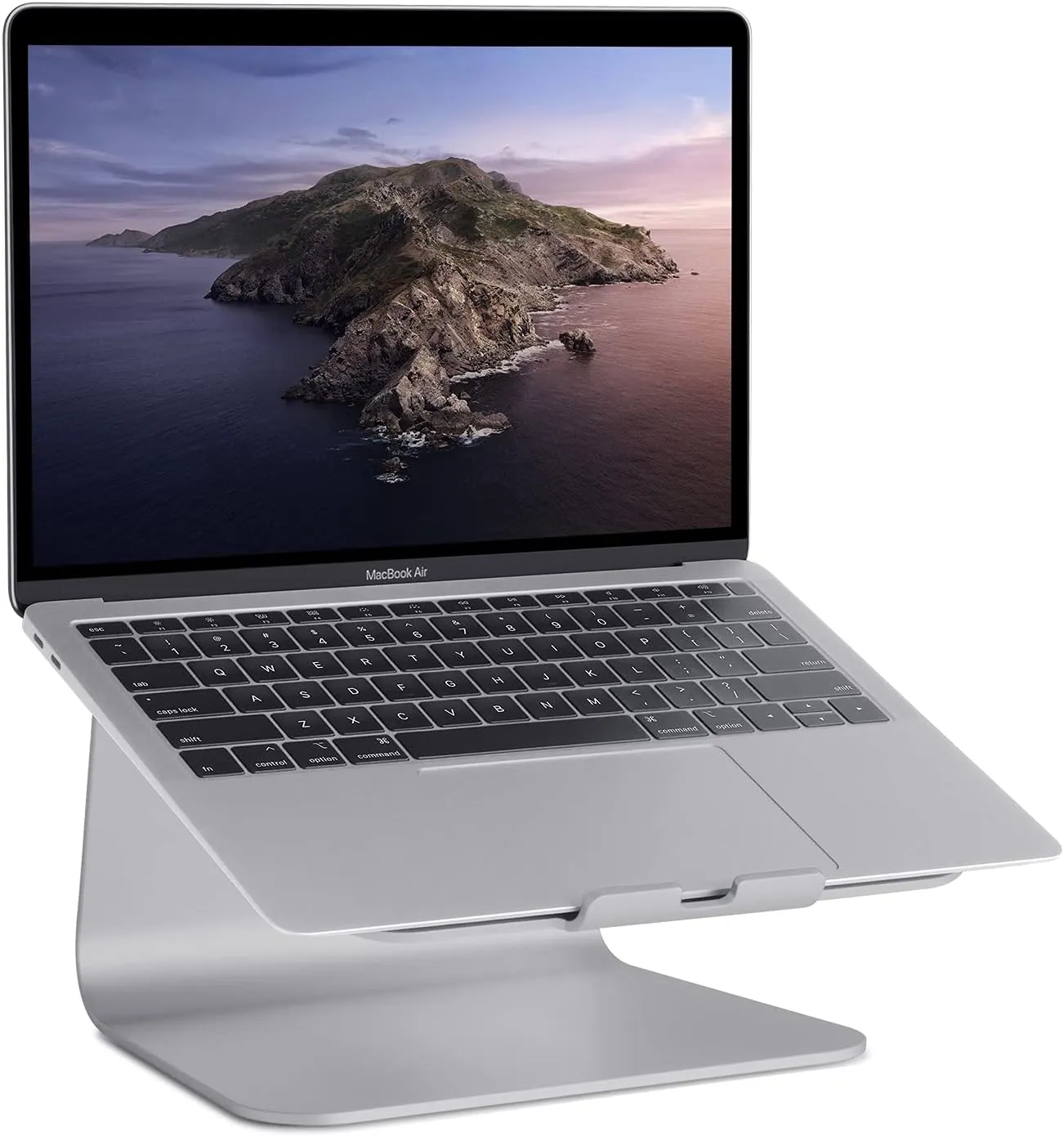
Who this review is for
You close the laptop lid at the end of the day and open it at a desk the next morning. You've been hunching over it for months. You've thought about a monitor but the flat is too small, or the budget is too tight, or the laptop screen is already decent enough.
A laptop stand with an external keyboard and mouse solves the ergonomics problem at a fraction of the cost of a monitor. The Rain Design mStand is the one to buy.
What makes it different
Pick up a budget laptop stand and it flexes. Type on it quickly and it bounces. The surface under the laptop is 2mm of aluminium that's been pressed into shape, and it behaves like 2mm of pressed aluminium.
The mStand is different because it's milled from a single 2.5mm thick plate, then the edges are forged (not folded) to create the supporting structure. There's no joint, no fold, no weld. Type on it as hard as you like and nothing moves. That's the one thing that separates it from the £18 clones on Amazon.
Recommended retailer Check the mStand on AmazonTypical price £45. Opens in a new tab. Check current priceThe height and why it matters
A laptop on a desk puts the screen at about 25cm above the desk. The mStand raises it another 15cm to 40cm. For most people at a standard 73cm desk, that's roughly eye level for a 14 inch laptop, and close enough for a 16 inch.
This is the whole ergonomic argument for a laptop stand. The top of the screen should be at or slightly below eye level so your neck sits straight. Every centimetre below that is another centimetre your neck tilts forward.
If you're over 6'1", a fixed-height stand might not lift the laptop enough. You'll want an adjustable stand like the Roost or a Roost clone. For most people at most desks, 15cm is the right amount.
Space underneath
The second thing the mStand does: there's 4cm of clearance underneath, exactly enough to slide a keyboard under when you're not using the laptop directly. On a small desk this is the difference between having space for a notebook and not.
The Logitech MX Keys Mini slides under completely. A full-size MX Keys just about fits. Anything taller than about 20mm (most mechanical keyboards) won't.
For a complete laptop-first layout, read Small Bedroom Desk Setup Ideas (UK) and the Logitech MX Keys Mini review. The stand works best when the keyboard and mouse do not steal back the space it creates.
Heat dissipation
This isn't marketing. Aluminium conducts heat. A MacBook running at full load on a desk hits around 45°C under the palm rest. On the mStand, where the bottom is in direct contact with a large aluminium surface, the same workload runs about 6 to 8°C cooler on the palm rest, because the heat is being pulled out through the bottom.
For a MacBook Pro doing light work, this is irrelevant. For a MacBook running a video render or compiling code, it's meaningful.
What doesn't work
No adjustability. The height is fixed. This is the trade-off for the rigidity. If you're tall, sitting on a high chair, or you want to use it standing with a standing desk converter, the mStand is the wrong choice. Get an adjustable stand.
The rubber pads. Four small rubber pads sit under the laptop. They're stuck on with adhesive. After a year or two, and especially if the laptop runs hot, the adhesive softens and the pads can slide or fall off. Replacement pads are cheap and easy to find; the pads on a three-year-old mStand I have needed replacing once.
Depth limit. The top surface fits laptops up to 26cm deep (10.4 inches). Every MacBook fits. Most 14 inch and 15 inch PC laptops fit. 17 inch laptops generally don't, as the depth exceeds the surface.
Colour options
Silver, space grey, gold, black. The space grey matches most modern PC laptops and MacBook Pros from 2017 to 2023. Silver matches older MacBooks. Black matches the current M4 MacBooks and most PC laptops with dark finishes. Gold is gold.
How it compares
Against the Nulaxy laptop stand (£22), the Nulaxy is adjustable (height and tilt), folds flat for travel, and is the budget option most reviewers land on. It flexes when you type on it, the joints wear over time, and it's obviously not as solid. Good for £22. The mStand is better for £45.
Against the Twelve South Curve (£60), the Curve is prettier and slightly taller. Same fixed-height limitation. Same aluminium construction. It's an aesthetic choice between the two if you're spending this much.
Against the Roost V3 (£85), the Roost folds flat, is adjustable, and is the stand you buy if you carry a laptop between places. For a stand that stays on one desk, the Roost is an expensive way to buy adjustability you won't use.
Where to go next
Continue from this article into the most relevant compact setup guides, reviews, and hubs.
Accessory guide
Best Monitor Arms for Small Desks UK 2026
Compare clamp arms, premium arms, and no-clamp options for smaller desks.
Read next
Desk depth
What Desk Depth Do You Need for a 24-Inch Monitor?
Check whether the accessory solves the real problem, or whether the desk is too shallow.
Read next
Desk hub
Small desk reviews
Browse compact desks that pair well with monitor arms, laptop stands, and tidy cable routes.
Read next